


DIY retirement and financial planning purpose built for Aussies
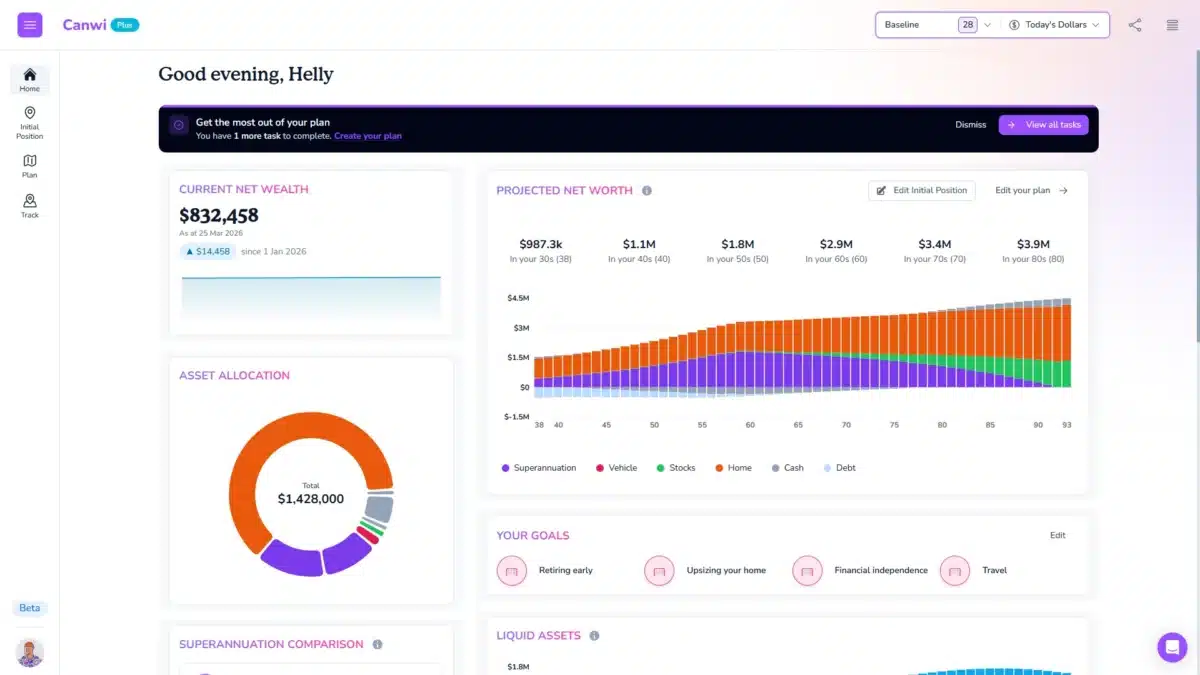
Canwi combines the comprehensive financial modelling engine an advisor would use to run your numbers with the ease of use of Canva.
Watch SuperGuide’s video demo of Canwi here

The problem with how most people plan retirement
1. A spreadsheet gets you 70% of the way, then breaks
Most people who get serious about retirement end up in Excel. It works until you try to model the interactions: a property sale that triggers CGT, that pushes you into Division 293, that changes what you can contribute, that changes your Age Pension entitlement three years later. That’s where spreadsheets quietly start giving wrong answers.
2. Asking an AI gets you an answer, not a plan
Ask a general-purpose AI what contributing to super and selling the investment property in 2029 does to your Age Pension in 2034, and you’ll get a number, delivered with exactly the same confidence whether it’s right or not. Sometimes you’ll spot the error. Often you won’t, because checking it means doing the work you were trying to avoid in the first place. General-purpose AI doesn’t hold your parcel history, your caps across five years, or the way one decision cascades into the next. Neither does a single-input online calculator.
3. The decisions get made anyway, just without the numbers
Around 11 million Australians don’t have access to financial advice. Not because they don’t want it, but because of what it costs and how few advisers there are. The decisions still get made. They just get made on gut feel.
Sometimes what the numbers do is change your trajectory. Getting a handful of choices right in your 40s and 50s, such as how you use the caps, when you sell, and what order you draw down in, can compound into a difference measured in hundreds of thousands of dollars by the time you stop working.
But just as often, the numbers give you permission. A plan isn’t only for growing the number at the end. It’s for knowing when you’ve got enough, and having the confidence to act on it.

SuperGuide + Canwi
SuperGuide explains the rule and provides a simple calculator to understand it. Canwi shows you what it does to your overall plan.
You’re already doing the hard part: reading up on how carry-forward contributions work, what the transfer balance cap means, and how the Age Pension assets test is applied. That knowledge is what most Australians never get. The next question is always the same: what does that mean for my plans?
Read the SuperGuide guide on downsizer contributions, then open your plan and add one to your timeline. Read about deeming rates, then look at what your own drawdown does to your entitlement at 70. Read about the CGT changes, then model selling before and after. SuperGuide gives you the rule. Canwi gives you the numbers.
How Canwi works
1. Enter where you are today
Income, expenses, super, investments, property, debts. Most people are set up in under an hour.
2. Construct your plan
Drag life events onto your timeline: retiring, selling an investment property, downsizing, salary sacrificing, helping the kids, an inheritance. Configure each one and your projections update in real time as you go.
3. Model the what-ifs
Wondering what retiring two years earlier does to the rest of your life? Drag the event and watch it change. For the bigger forks in the road, such as selling the properties now or holding them to retirement, or going hard on super versus paying down the mortgage, duplicate the plan and build the alternative scenario, then compare the two side by side. This is the part people find most useful: not “what will happen”, but “which of these leaves me better off, and by how much”.
4. Stress-test it
A projection follows one path. Real markets don’t. Canwi runs your plan through a thousand simulated futures, with returns drawn at random around volatility assumptions set in line with long-run historical performance. You can change those assumptions if you disagree with them. What comes back is a percentage: how often your plan still works. Run it again on any version of your plan, as many times as you like.
5. Keep it current
Enter your actuals as the years go by, and update the plan when the rules or your circumstances change. It’s a plan you keep, not a one-off calculation.
Do it yourself.
Not by yourself.
Canwi is a DIY tool. That doesn’t mean we hand you the keys and disappear.
Free account
Sign up and start building. No card, no trial clock. Enter your position, put events on the timeline, and see what it does before you decide whether it’s worth paying for.
A 15-minute intro call, free
Book a call and we’ll get you oriented – what to enter first, how the timeline works, what Canwi will and won’t do for your situation.
Inputs review (paid members)
The most common reason a projection looks wrong is a number entered in the wrong place. Book a one-on-one session and we’ll go through your plan with you – check the inputs, explain what the outputs are actually saying, and point out things worth modelling that you might not have thought of.
Q&A and coaching sessions
We run these regularly. Ask about your own plan, ask how a particular rule is handled, or sit in while we build a sample plan end to end.
What Canwi models
Some of the areas Canwi models include:
- Tax: brackets, deductions, offsets, Division 293, Medicare levy, Medicare levy surcharge
- Income: salary, bonuses, rental, other income
- Super: contributions, tax, caps, carry-forward, drawdown planning
- Property: buy/sell, refinance, upgrade, downsize, CGT, six-year rule, deeming
- Investments: returns, contributions, dividends
- Rental property: income and expenses, negative gearing, CGT
- Debt: mortgage, refinancing, HECS/HELP
- Budgets: changing expenses, one-offs, inflation
- Family benefits: Childcare Subsidy, Family Tax Benefit Part A and Part B
- Age Pension: income test, assets test, deeming, threshold indexation, payment rate indexation
…and dozens of other factors.
Outputs include net worth over time, year-by-year cashflow, tax paid, super balance, and a chance-of-success view showing how your plan holds up across a thousand simulated market futures rather than a single average return.
Don’t just take our word for it
Before Canwi
“Having hit our 50s and with the arrival of our first grandchild, we decided it was about time to get serious about retirement planning. I spent months researching the rules around superannuation (concessional and non-concessional) and CGT, investment options and building out a complex spreadsheet to pull it all together.”
What changed
“That complex spreadsheet I had poured hundreds of hours into? I reproduced it in Canwi in a couple of hours.”
Then the CGT rules changed.
“To put it mildly, we were horrified, thinking it meant we wouldn’t be able to retire early. I jumped back into Canwi and modelled about a dozen options. To my surprise, I confirmed we would still be okay, but it dramatically altered our previously planned approach.”
Matt’s original plan was to hold everything until retirement and sell when he was no longer earning. The modelling showed a different approach suited his situation: accelerating the sale, clearing the mortgages, and putting the balance into super as non-concessional contributions. He then sent the plan to his accountant to check, using Canwi’s shareable plan link.
“They reviewed the plan and were surprised at how well Canwi captured and implemented all the complex rules around super, CGT, etc.”
The moment it clicked
“The ‘aha’ moment was realising the ability to very, very quickly build out multiple options to compare and contrast them… The bottom line, it gave us the confidence to know we can retire early.”


Who Canwi is a good fit for
- You want to understand your own numbers rather than hand them to someone else.
- You’re comfortable entering your financial details and reading a chart or table.
- Your situation has some complexity: super strategy, an investment property, a couple with different incomes and retirement dates, a business sale.
- You want to test decisions before you make them, or sanity-check advice you’ve already received.
Who it isn’t for
- If you want someone to tell you which super fund or ETF to buy, Canwi won’t do that. It doesn’t recommend products.
- If you want a person to take responsibility for the decision, you want a licensed financial adviser. Canwi can make that conversation shorter and cheaper, but it isn’t a substitute for it.
- If you have no interest in touching the numbers yourself, this isn’t the right tool.
Frequently asked questions
Canwi provides general information and calculator outputs only. It is not a substitute for personal financial advice.
